2.1 数据可视化流程
从「拿到一张表」到「画出一张图」的完整链路
The complete pipeline from "getting a table" to "drawing a chart"
你的原案例
Your Original Case
3 个可视化流程模型:① 参考 Card 1999 模型绘制流程图(Box Flowcharts)→ ② Mackinlay 自动化准则 → ③ van Wijk 模型(含交互反馈)。
3 visualization pipeline models: ① Reference the Card 1999 model for box flowcharts → ② Mackinlay's automation principles → ③ van Wijk's model (with interaction feedback).
原始图片是你的概念图。本节课用 D3 重画这张概念图,每个节点点击后能展开细节。
The original image is your concept map. This lesson uses D3 to redraw this concept map — every node expands details when clicked.
嵌入理论:可视化流程的三个经典模型
Embedded Theory: Three Classic Models of the Visualization Pipeline
| 模型 | 作者 / 年份 | 核心思想 |
|---|---|---|
| Card 数据流模型 | Card, Mackinlay & Shneiderman, 1999 | 原始数据 → 数据表 → 视觉结构 → 视图(嵌套变换 D→T→V→C/L/S) |
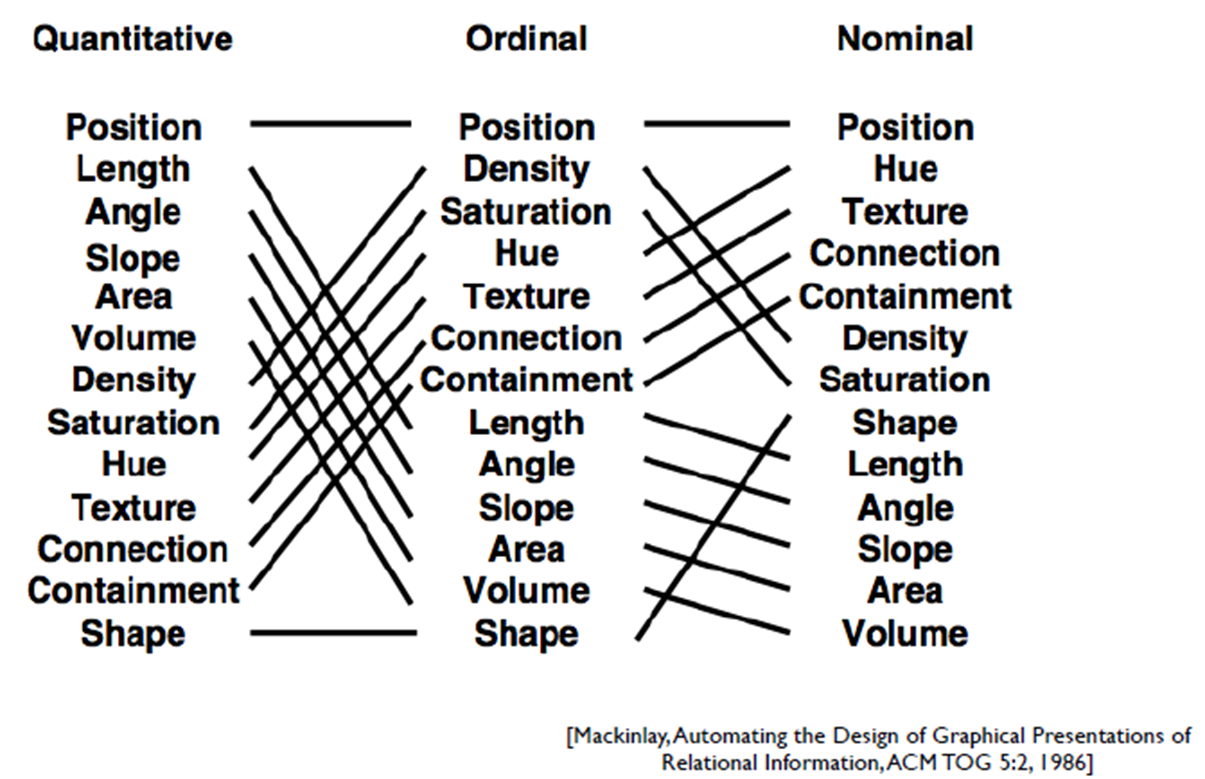
| Mackinlay 自动化准则 | Mackinlay 1986 | 对每种数据类型,自动选「量化准确性最高」的视觉通道(如:数值→位置、类别→色调) |
| van Wijk 反馈模型 | van Wijk 2005 | View ⇆ Filter ⇆ Param ⇆ Other Views —— 强调交互反馈循环 |
| Model | Author / Year | Core Idea |
|---|---|---|
| Card Data Flow Model | Card, Mackinlay & Shneiderman, 1999 | Raw data → data table → visual structure → view (nested transformations D→T→V→C/L/S) |
| Mackinlay's Automation Principles | Mackinlay, 1986 | For each data type, automatically pick the visual channel with the highest “quantitative accuracy” (e.g., quantitative → position, categorical → hue) |
| van Wijk Feedback Model | van Wijk, 2005 | View ↔ Filter ↔ Param ↔ Other Views — emphasizing the interaction feedback loop |
核心教学要点:三个模型描述同一件事的不同侧面—— Card 给"管道",Mackinlay 给"自动决策",van Wijk 给"反馈环"。 三者是叠加关系,不是冲突关系。
Core teaching points: the three models describe different facets of the same thing — Card gives you the “pipeline,” Mackinlay gives you “automated decisions,” and van Wijk gives you the “feedback loop.” They layer on top of each other rather than conflict.
- Card 模型:告诉你"transform 之后该 mapping,mapping 之后该 view"
- Card model: tells you “after transform comes mapping, after mapping comes view”
- Mackinlay:告诉你"mapping 这一步怎么自动决策"
- Mackinlay: tells you “how to automate the mapping step”
- van Wijk:告诉你"view 之后还要把用户操作 feed 回去"
- van Wijk: tells you “after view, you still need to feed user actions back”
关键代码 ① SVG 流程图节点 + 箭头
Key Code — SVG Flowchart Nodes + Arrows
5 个 step 节点横向排列,相邻节点之间用 SVG marker 画的箭头连接。
5 step nodes arranged horizontally, connected by SVG-marker-drawn arrows between adjacent nodes.
⭐ // 1. 用 <defs> + <marker> 定义箭头
svg.append("defs").append("marker")
   .attr("id", "arrowhead")
   .attr("viewBox", "0 -5 10 10")
   .attr("refX", 8)            // 箭头位置校准
   .attr("markerWidth", 6)
   .attr("orient", "auto")       // 跟随线方向旋转
   .append("path").attr("d", "M0,-5L10,0L0,5").attr("fill", "#94a3b8");

⭐ // 2. 用 marker-end 引用箭头(重要)
svg.append("line")
   .attr("marker-end", "url(#arrowhead)")
   .attr("x1", x1).attr("y1", y).attr("x2", x2).attr("y2", y);

⭐ // 3. 节点 ↔ 数据 绑定:d3.data + click 事件
svg.selectAll(".node").data(nodes)
   .join("g")
   .on("click", (event, d) => {
     // ⭐ 关键:classed 是 D3 状态管理核心 API
     svg.selectAll(".node").classed("selected", n => n.id === d.id);
     document.getElementById("d-4-1-detail").innerHTML = d.detail;
   });
关键点解释:
marker-end="url(#arrowhead)" 是 SVG 引用的方式 —— 把 <defs> 里定义的形状"嵌入"到线段末端;
classed("selected", predicate) 接收布尔函数,一次性切换所有节点的"selected"状态,避免自己写 forEach。
Key explanation:
marker-end="url(#arrowhead)" is SVG's referencing mechanism — it “embeds” a shape defined inside <defs> at the line's end;
classed("selected", predicate) takes a boolean function and toggles the “selected” state of every node in one call, so you avoid writing forEach yourself.
▶ 交互流程图演示
▶ Interactive Flowchart Demo
👆 点击任一节点查看在 Card / Mackinlay / van Wijk 三个模型中的对应
👉 Click any node to see its mapping in the Card / Mackinlay / van Wijk models